Big Data and Cloud Platforms (Module 2)
Data pipelines on cloud (Storage)
Storage
Storage models
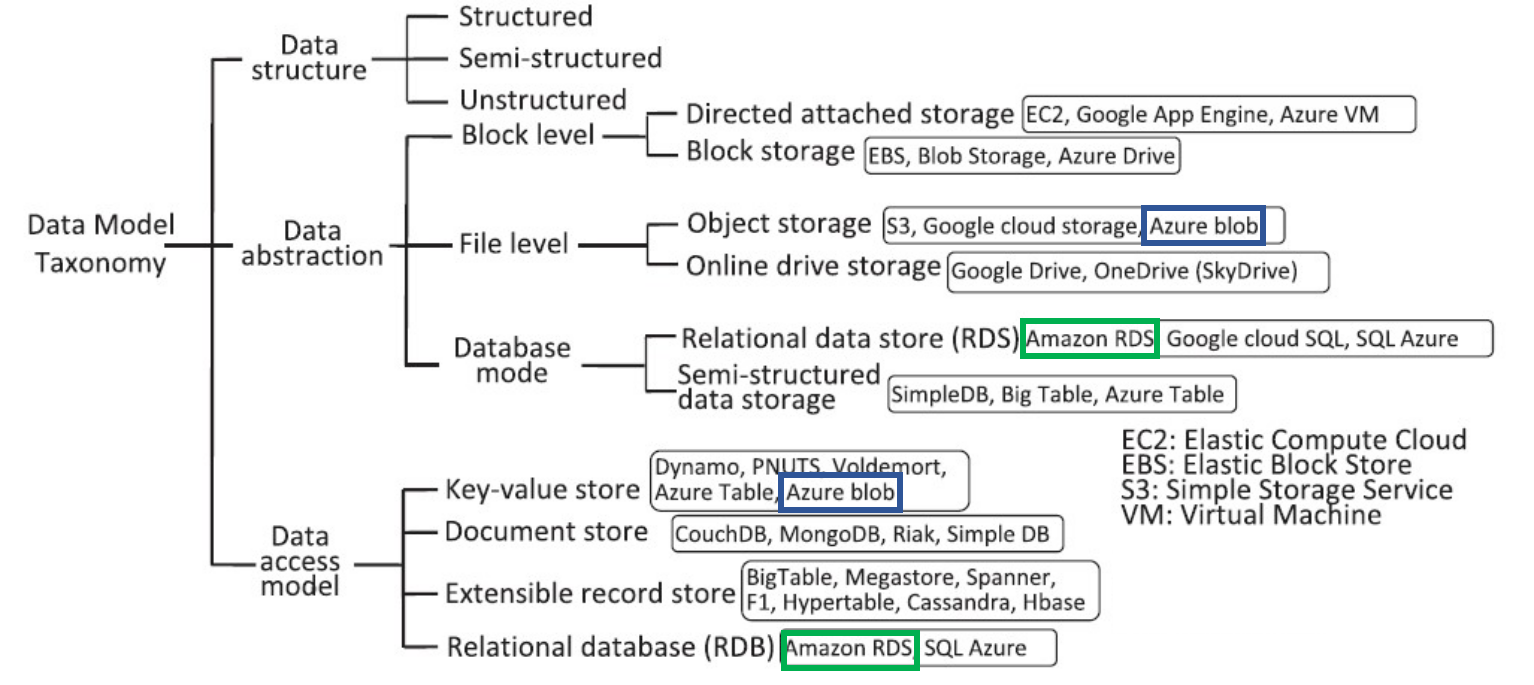
Taxonomy of storage models (Mansouri et al. 2017)
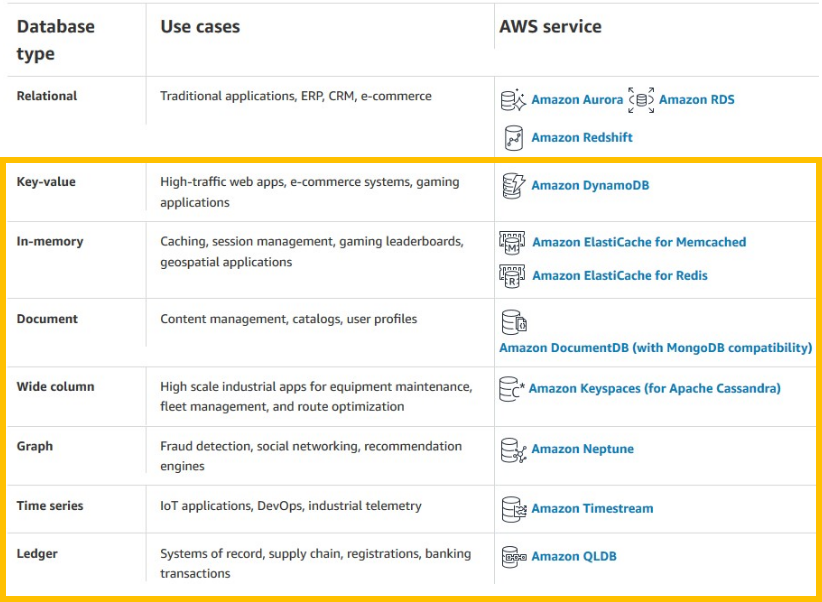
Storage models (AWS)
| Data structure | Data abstraction | Data access |
|---|---|---|
| Structured | Database | Relational |
Relational database
- Store data with predefined schemas and relationships between them
- Support ACID transactions
- Maintain referential integrity

Storage models (AWS)
| Data structure | Data abstraction | Data access |
|---|---|---|
| Semi/unstructured | Database | * |
- Key/value: store and retrieve large volumes of data
- Document: store semi-structured data as JSON-like documents
- Wide column: use tables but unlike a relational database, columns can vary from row to row in the same table
- Graph: navigate and query relationships between highly connected datasets
- … and more
Storage models (Google Cloud)
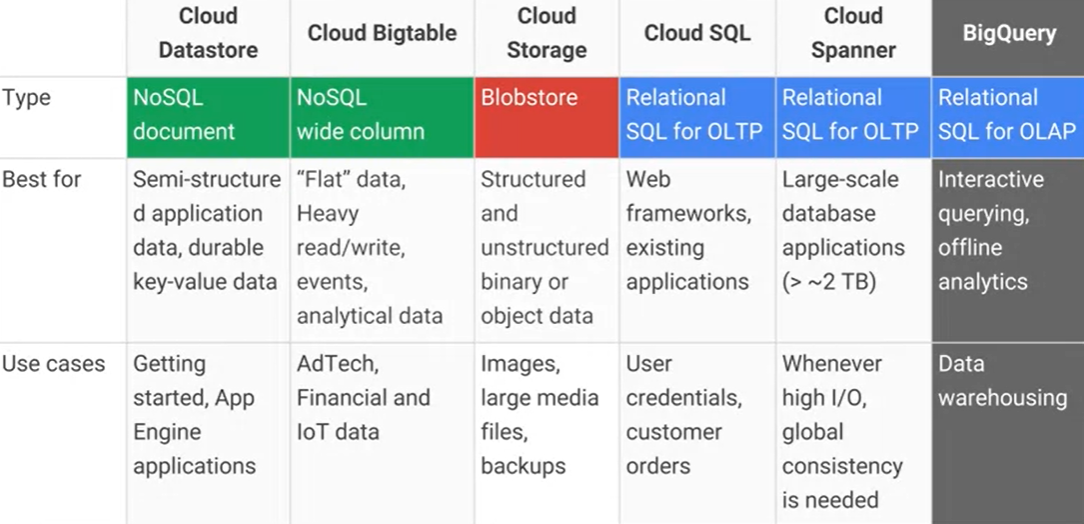
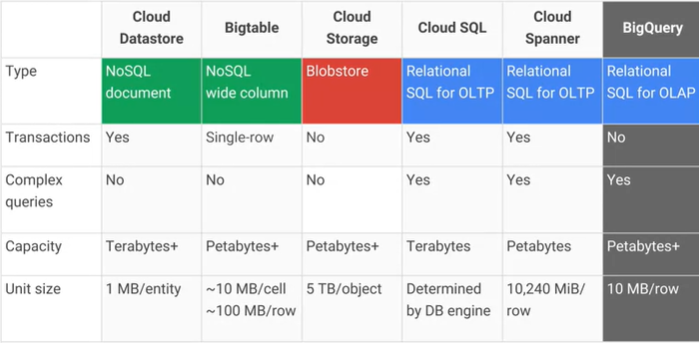
Storage: access frequency (AWS)
AWS S3: storage classes
- Standard: general purpose
- Infrequent (rapid) access
- One Zone-IA: lower-cost option for infrequently accessed data that do not require high availability and resilience
- Glacier: low-cost storage class for data archiving, three retrieval options that range from a few minutes to hours
- Deep Glacier: long-term retention for data accessed once/twice a year.
- E.g., retain data sets for 10 years or longer
- Intelligent-Tiering: move objects between access tiers when access patterns change
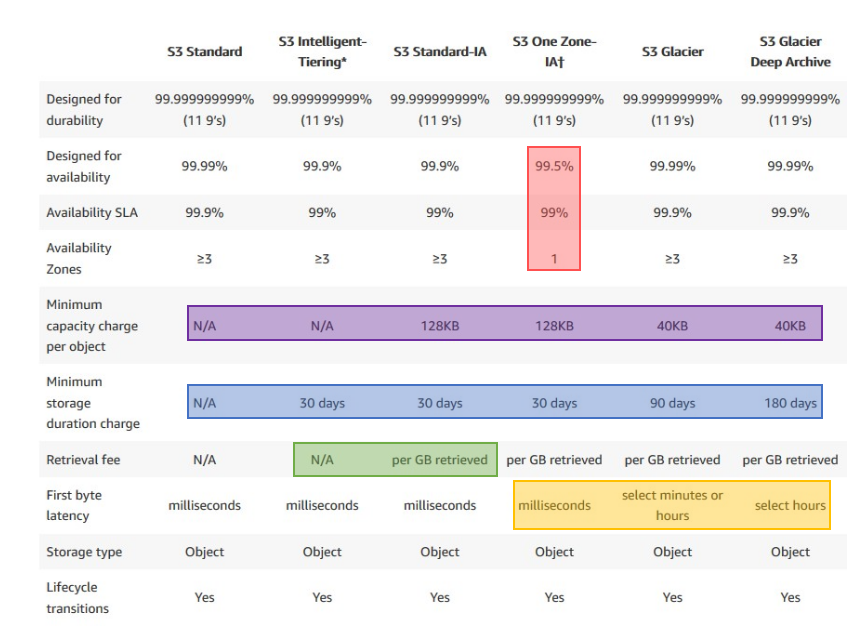
Storage: access frequency (AWS)
- Rules that define actions that Amazon S3 applies to a group of objects
Two types of actions:
- Transition: when objects transition to another storage class.
- E.g., archive objects to the S3 Glacier storage 1 year after creating them
- Expiration: when objects expire.
- Amazon S3 deletes expired objects on your behalf
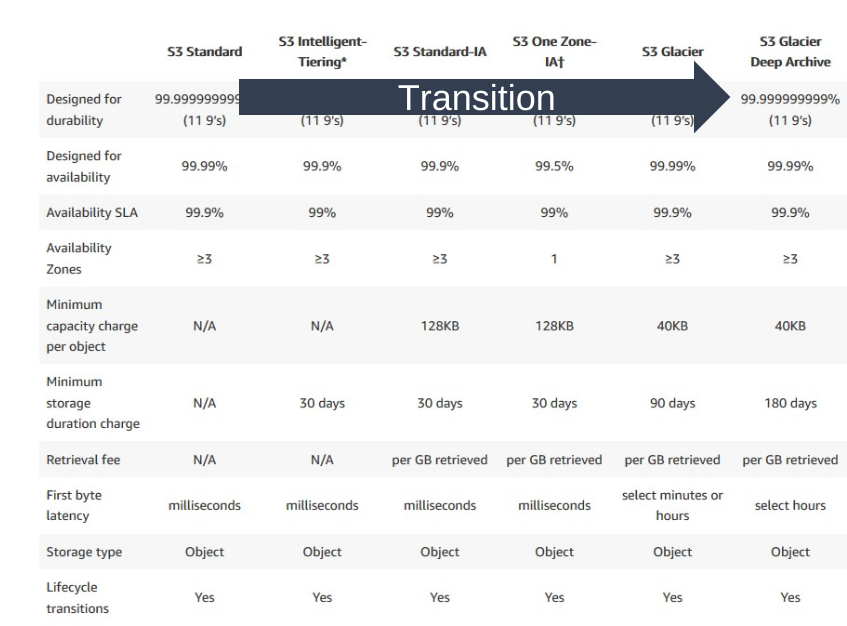
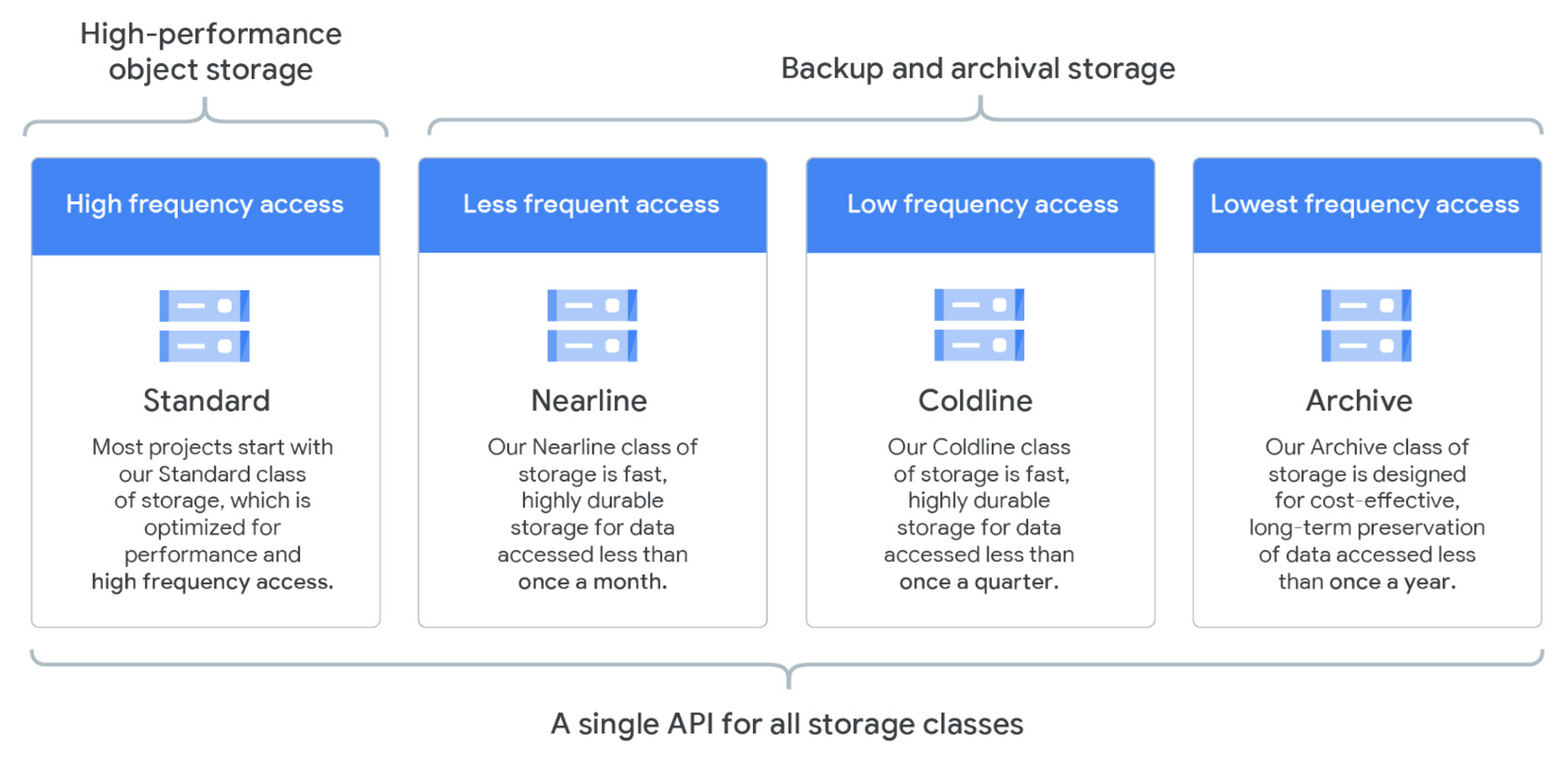
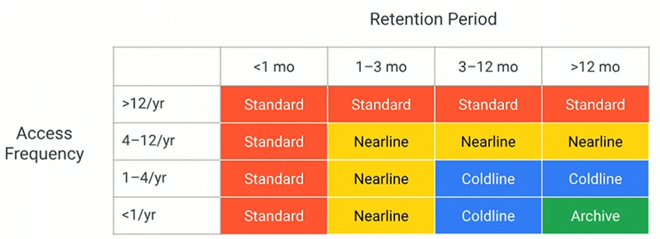
Storage: access frequency (Google Cloud)
Organizing the data lake
Having consistent principles on how to organize your data is important
- To build standardized pipelines with the same design with regard to where read/write data
- Standardization makes it easier to manage your pipelines at scale
- Helps data users search for data in the storage and understand exactly what they need
- Decoupling storage from processing
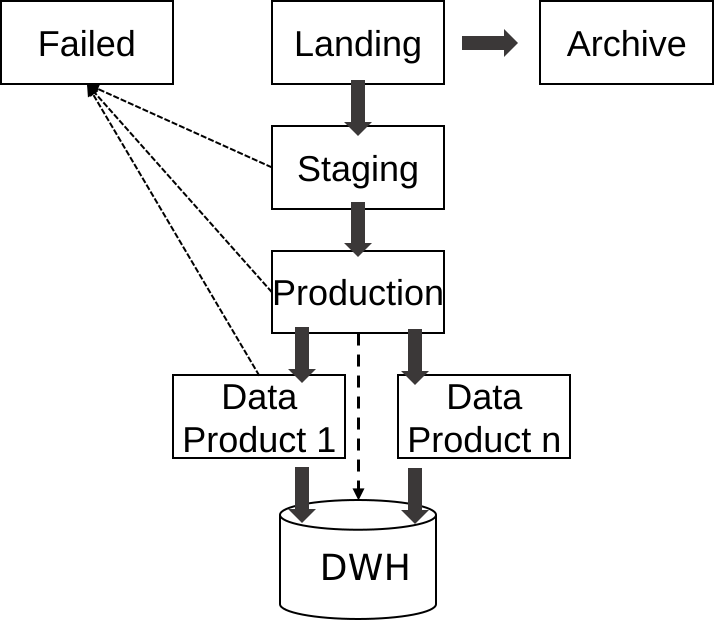
Organizing the data lake
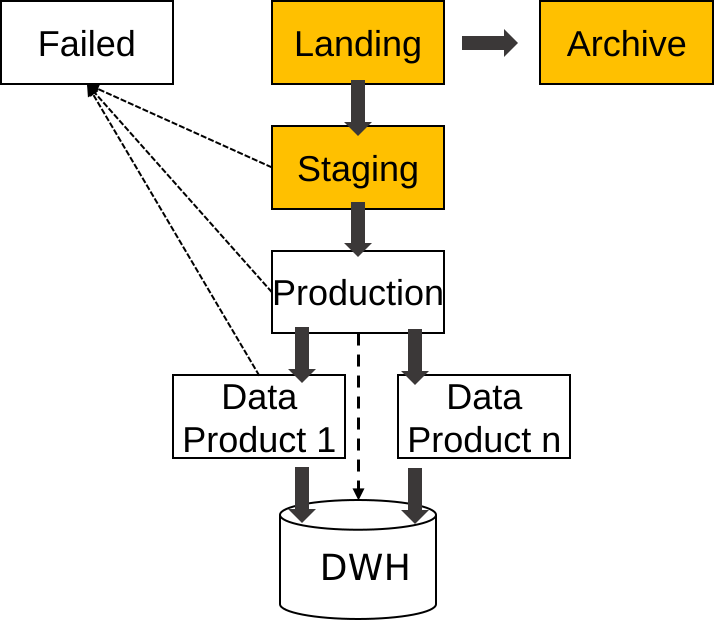
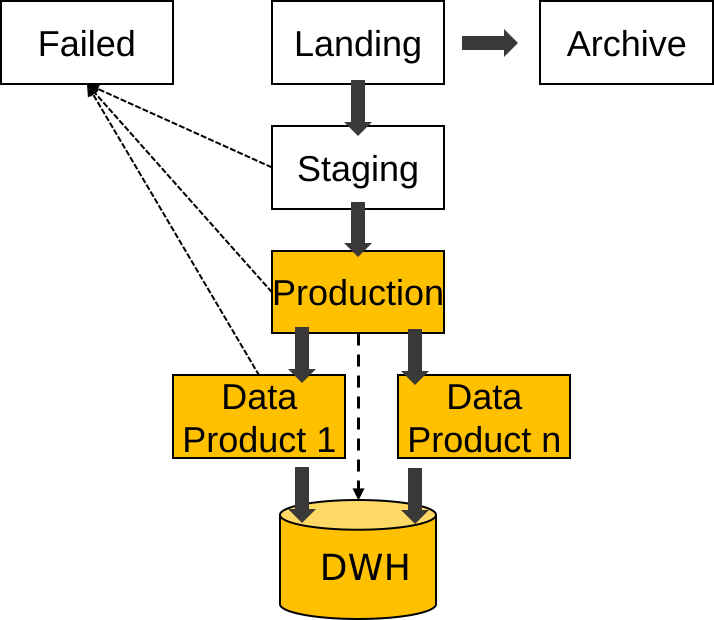
Landing area (LA)
- Save raw data from ingestion
- Transient, data is not stored for long term
Staging area (SA)
- Raw data goes through a set of common transformations: ensuring basic quality and making sure it conforms to existing schemas for this data source and then data is saved into SA
Archive area (AA)
- After saving into SA, raw data from LA should be copied into the archive to reprocess any given batch of data by simply copying it from AA into LA
- Useful for debugging and testing
Organizing the data lake
Production area (PA)
- Apply the business logic to data from SA
Pass-through job
- Copy data from SA to PA and then into DWH without applying any business logic
- Having a data set in the data warehouse and PA that is a replica can be helpful when debugging any issues with the business logic
(Cloud) data warehouse (DWH)
Failed area (FA)
- You need to be able to deal with all kinds of errors and failures
- There might be bugs in the pipeline code, and cloud resources may fail
Organizing the data lake
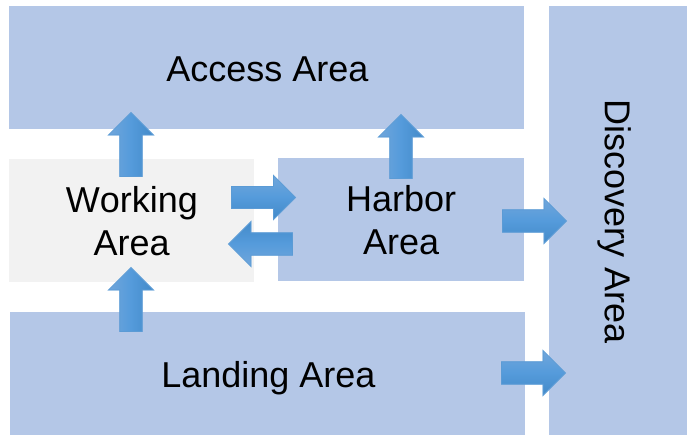
Alternative organizations are available
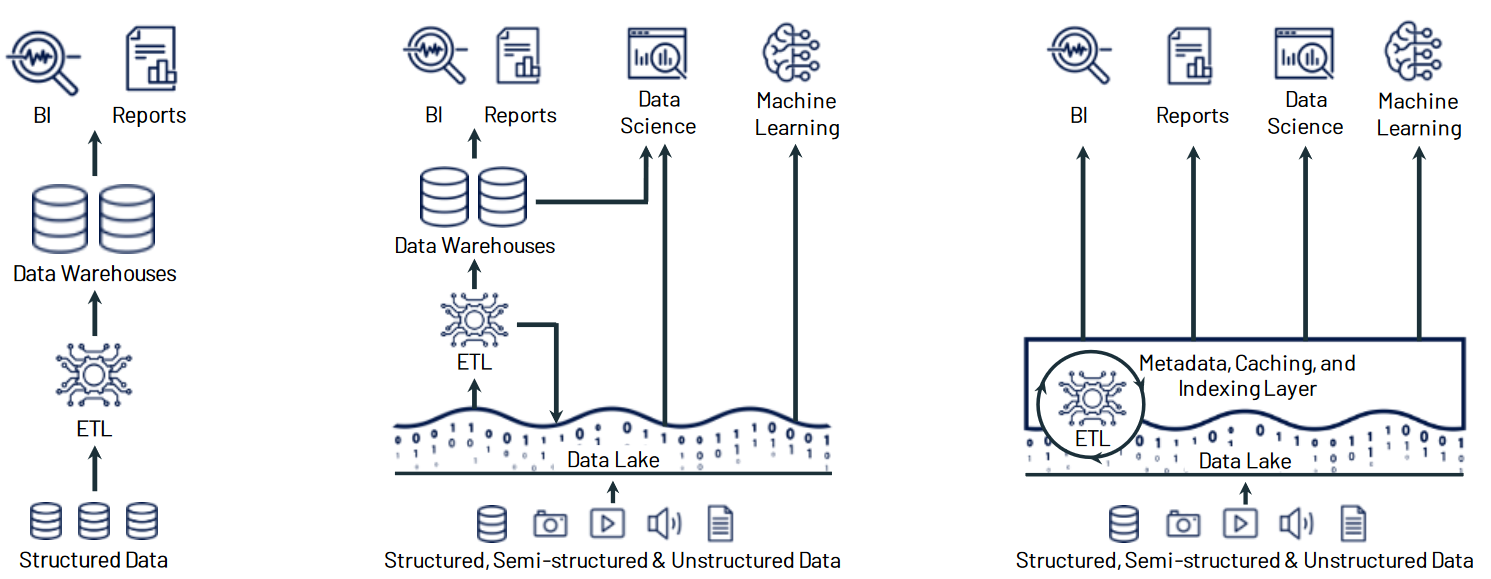
“A data lake is a central repository system for storage, processing, and analysis of raw data, in which the data is kept in its original format and is processed to be queried only when needed. It can store a varied amount of formats in big data ecosystems, from unstructured, semi-structured, to structured data sources.”
Data Independence
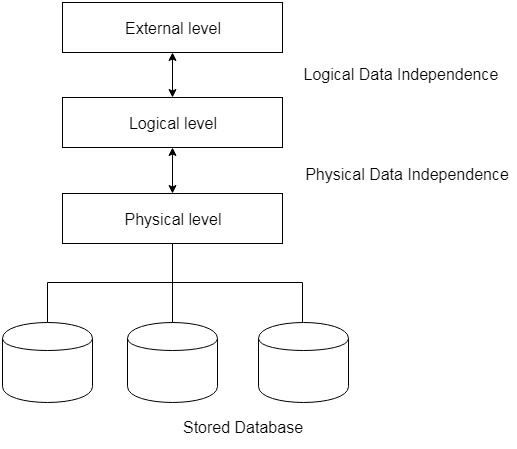
Data independence: modify the schema at one level of the database system without altering the schema at the next higher level
- It can be explained using the three-schema architecture
Data Lakehouse
From DWH to Data Lakehouse
Data Lakehouse
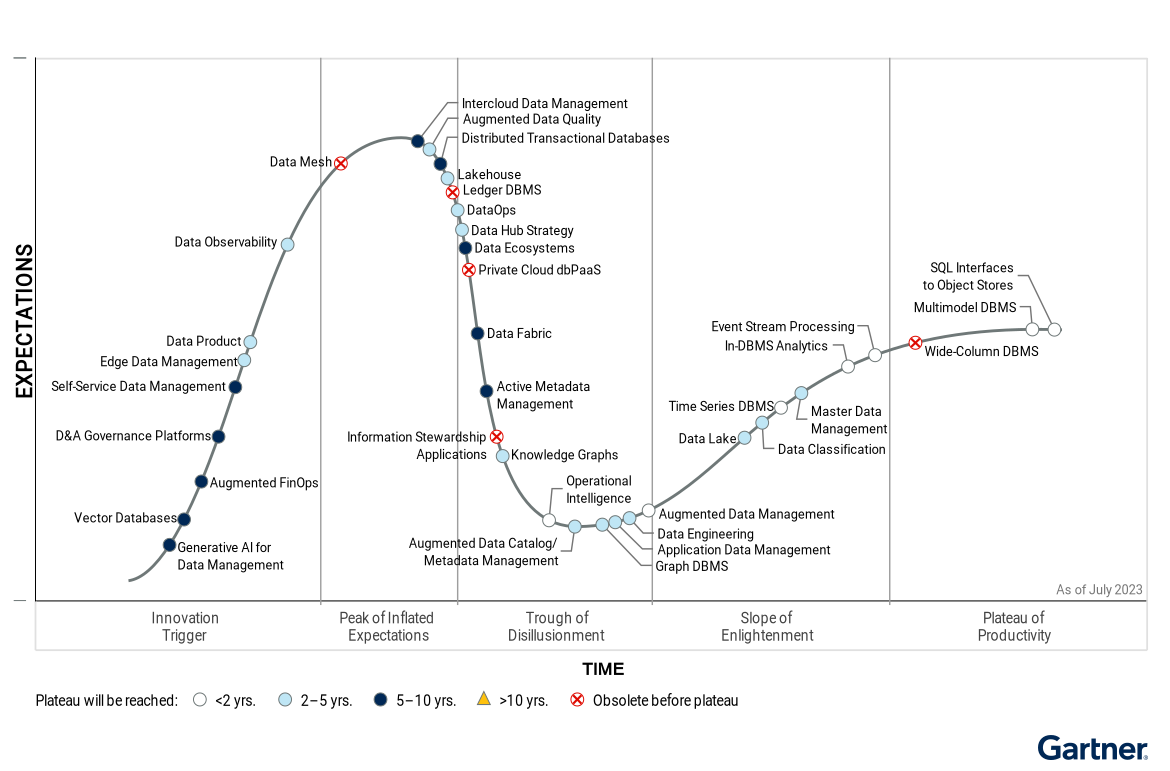
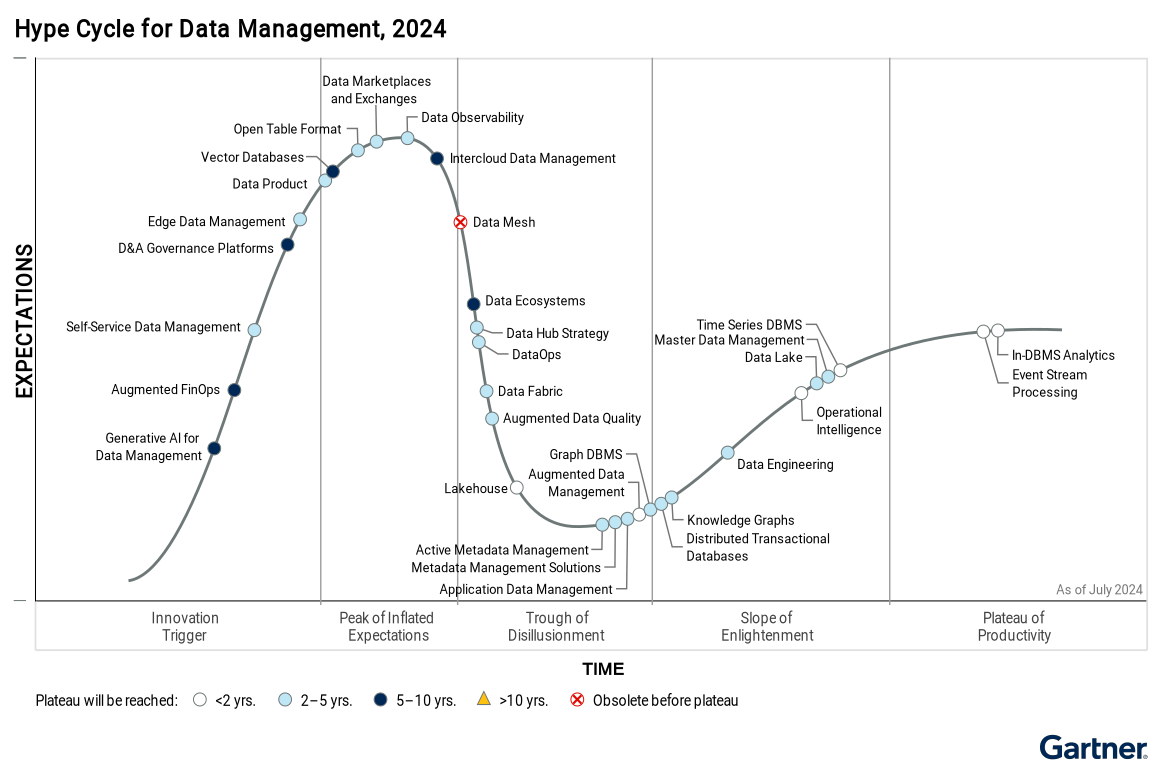
The market is pushing for the adoption of Lakehouse as a standard de facto
Data Lakehouse (Armbrust et al. 2021)
Idea
- Store data in a low-cost object store using an open file format such as Apache Parquet
- Implement a transactional metadata layer on top of the object store that defines which objects are part of a table version
- Implement management features within the metadata layer
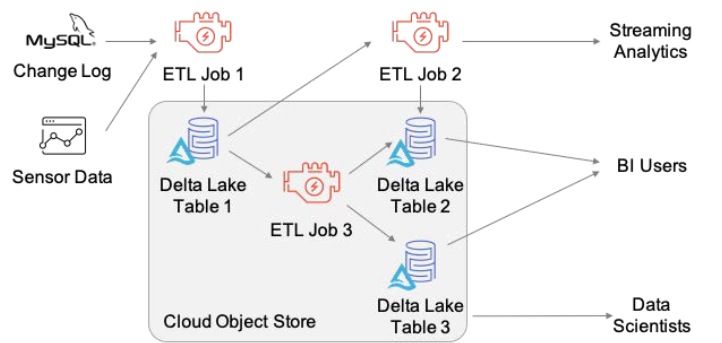
Lakehouse
Delta Lake (Armbrust et al. 2020)
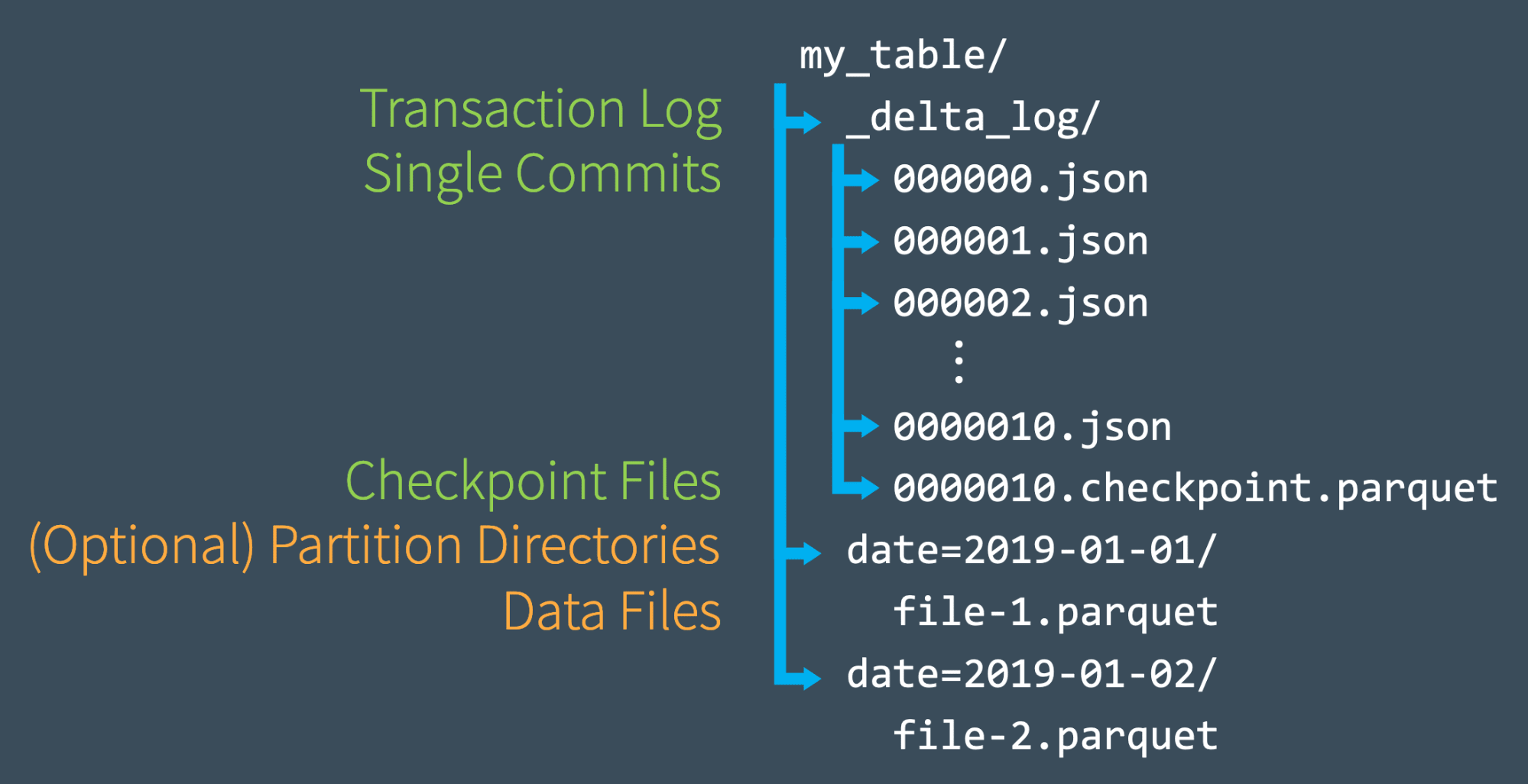
Delta Lake uses a transaction log and stores data into Apache Parquet for fast metadata operations
- E.g., quickly search billions of table partitions
- The log is stored in the
_delta_logsubdirectory - The delta log contains
- Sequence of commits JSON objects with increasing, zero-padded numerical IDs to store the log records
- Occasional checkpoints for specific log objects that summarize the log up to that point
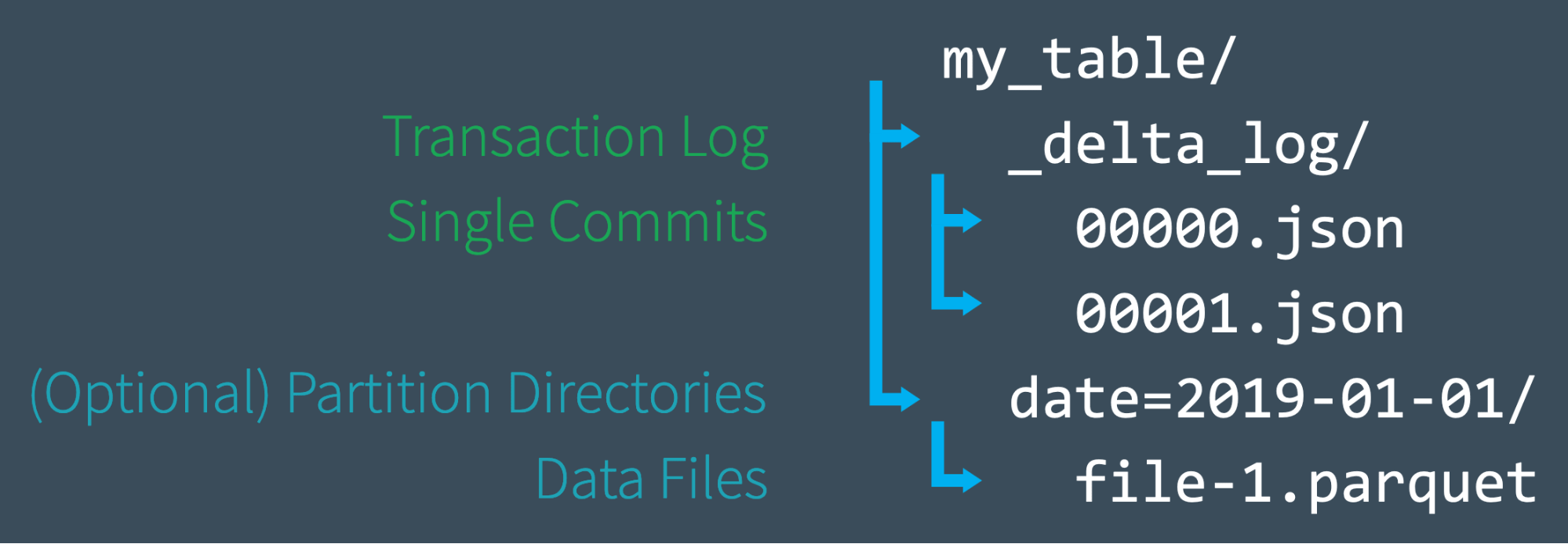
Delta Lake
Once we have made several commits to the transaction log, Delta Lake saves a checkpoint file in Parquet format in _delta_log
- Delta Lake automatically generates checkpoints as needed to maintain good read performance.
- Checkpoints store all the non-redundant actions in the table’s log up to a certain log record ID, in Parquet format
- Some sets of actions are redundant and can be removed
- Read the last checkpoint object in the table’s log directory, if it exists, to obtain a recent checkpoint ID
Delta Lake
Checkpoints save the entire state of the table at a point in time.
A “shortcut” to reproducing a table’s state to avoid reprocessing what could be thousands of tiny, inefficient JSON files.
Spark runs a listFrom v operation to view all files in the transaction log, starting from v
- … quickly skips to the newest checkpoint file,
- … only processes JSON commits made since the most recent checkpoint file was saved.
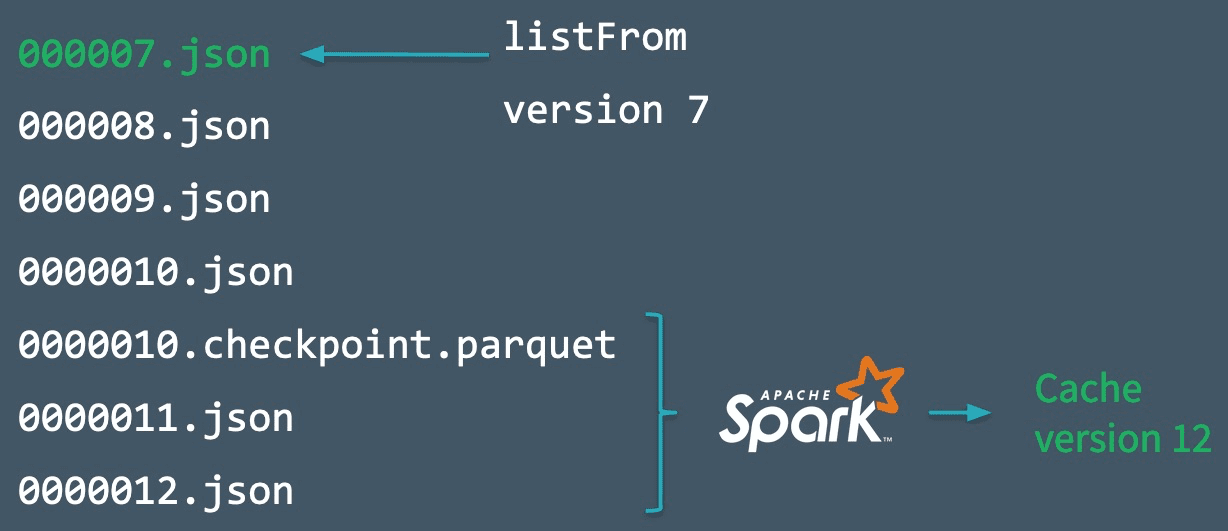
Imagine that we have created commits up to 000007.json and that Spark has cached this version of the table in memory.
- In the meantime, other writers have written new data to the table, adding commits up to
0000012.json. - To incorporate these new transactions, Spark runs a
listFromversion 7 operation to see the new changes to the table. - Rather than processing all of the intermediate JSON files …
- … Spark skips ahead to the most recent checkpoint file since it contains the entire state of the table at commit
#10.
Delta Lake
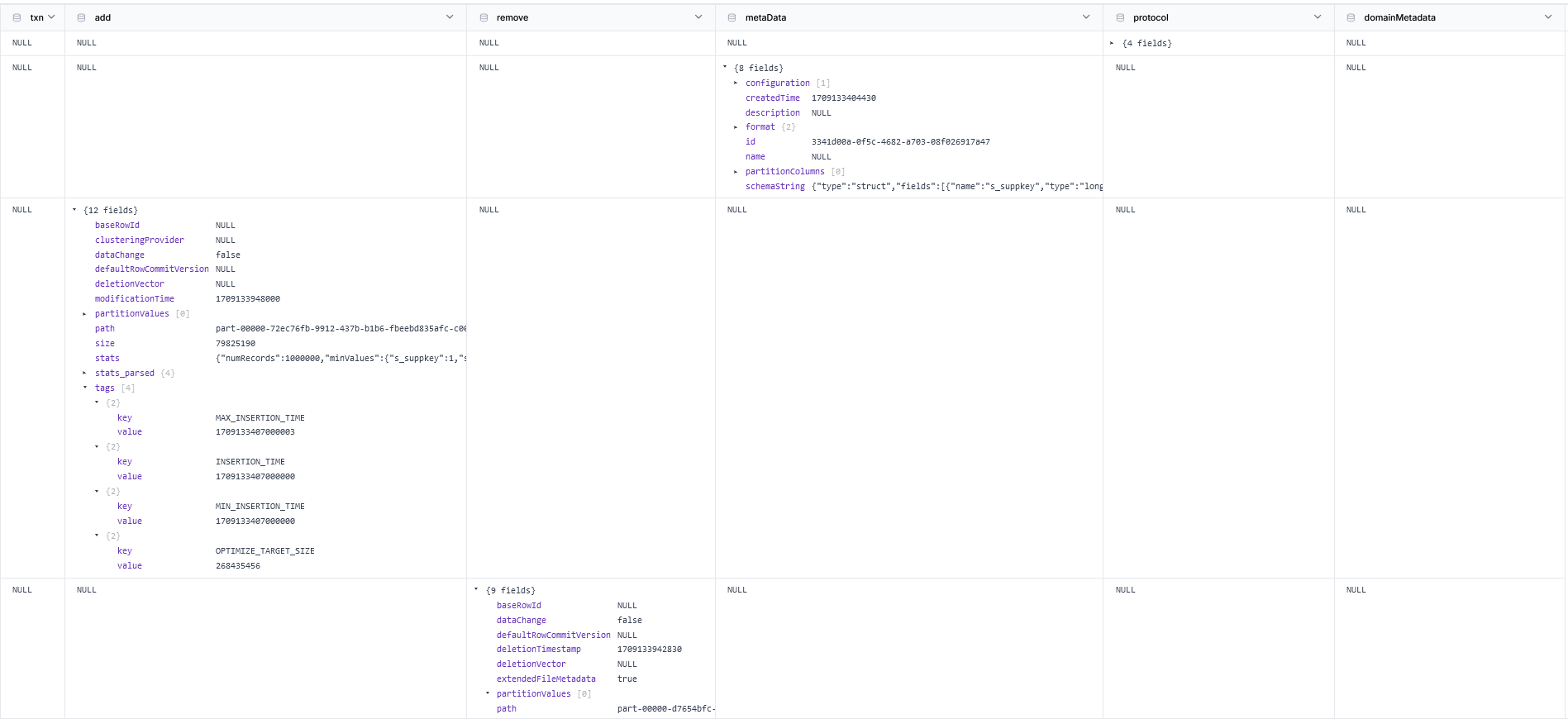
Checkpoint 00000000000000000002.checkpoint.parquet
Delta Lake
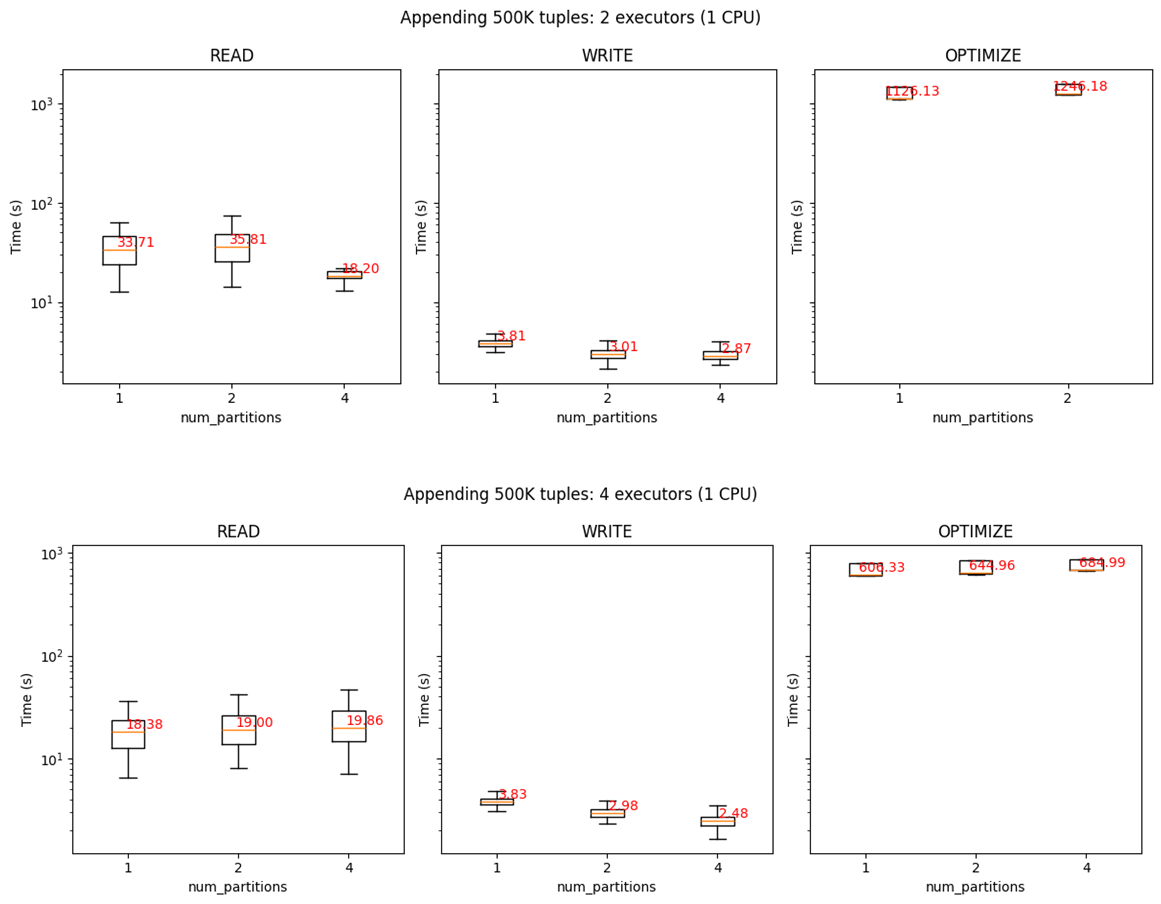
Optimize: Delta Lake can improve the speed of read queries from a table by coalescing small files into larger ones.
- Bin-packing optimization is idempotent, meaning that if it is run twice on the same dataset, the second run has no effect.
- Bin-packing aims to produce evenly-balanced data files with respect to their size on disk, but not necessarily balanced #tuples.
- However, the two measures are most often correlated.
- Python and Scala APIs for executing OPTIMIZE operations are available.
from delta.tables import *
deltaTable = DeltaTable.forPath(spark, pathToTable)  # For path-based tables
# For Hive metastore-based tables: deltaTable = DeltaTable.forName(spark, tableName)
deltaTable.optimize().executeCompaction()
# If you have a large amount of data and only want to optimize a subset of it, you can specify an optional partition predicate using `where`
deltaTable.optimize().where("date='2021-11-18'").executeCompaction()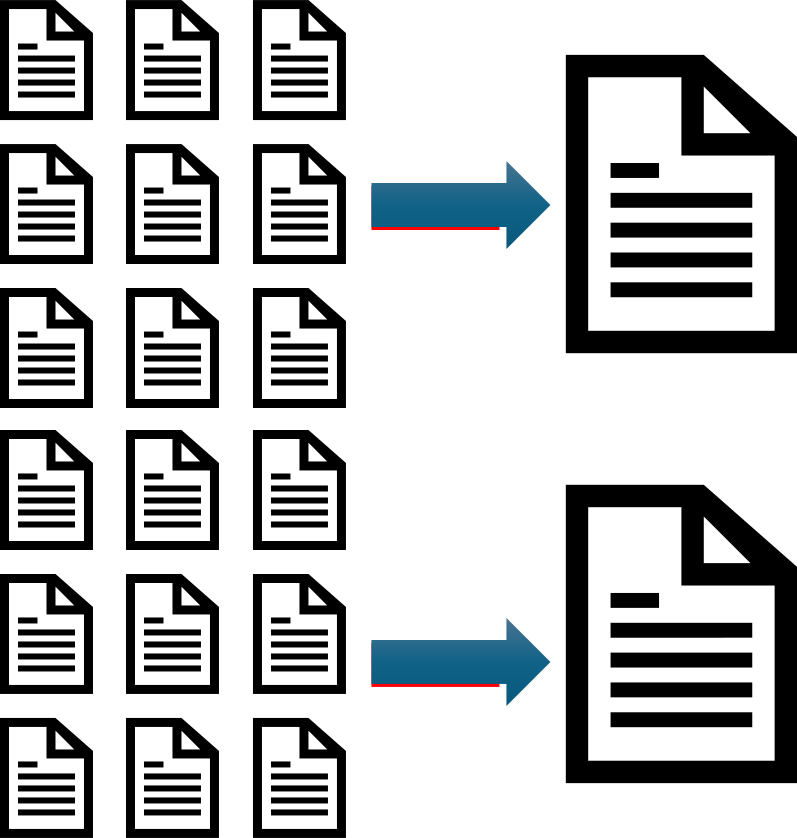
Auto compaction automatically reduce small file problems.
- Occur after a write to a table has succeeded and runs synchronously on the cluster that has performed the write.
- Compact files that haven’t been compacted previously.
Delta Lake
Check the scalability with respect to the length of the log
i = 0
while i < 20000:
    if i % 10 == 0:
        spark.sql("select sum(quantity) from lineitem")  # Read the whole fact
    spark.sql("insert (500K tuples) into lineitem")  # Append new tuples
    i += 1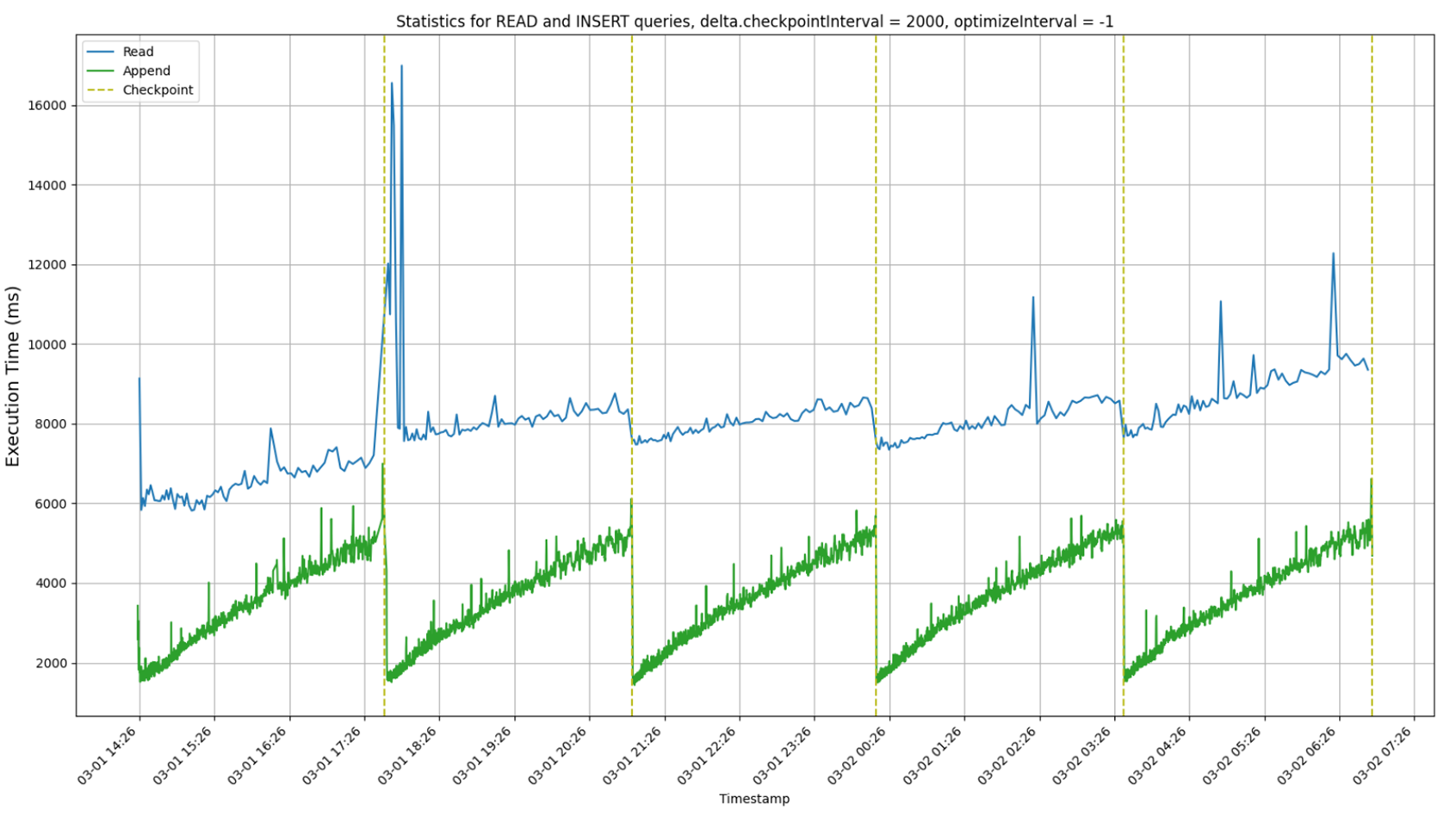
Scalability
Delta Lake
Check the scalability with respect to the length of the log
i = 0
while i < 20000:
    if i % 10 == 0:
        spark.sql("select sum(quantity) from lineitem")  # Read the whole fact
    spark.sql("insert (500K tuples) into lineitem")  # Append new tuples
    if i % 100 == 0: OPTIMIZE  # Optimize
    i += 1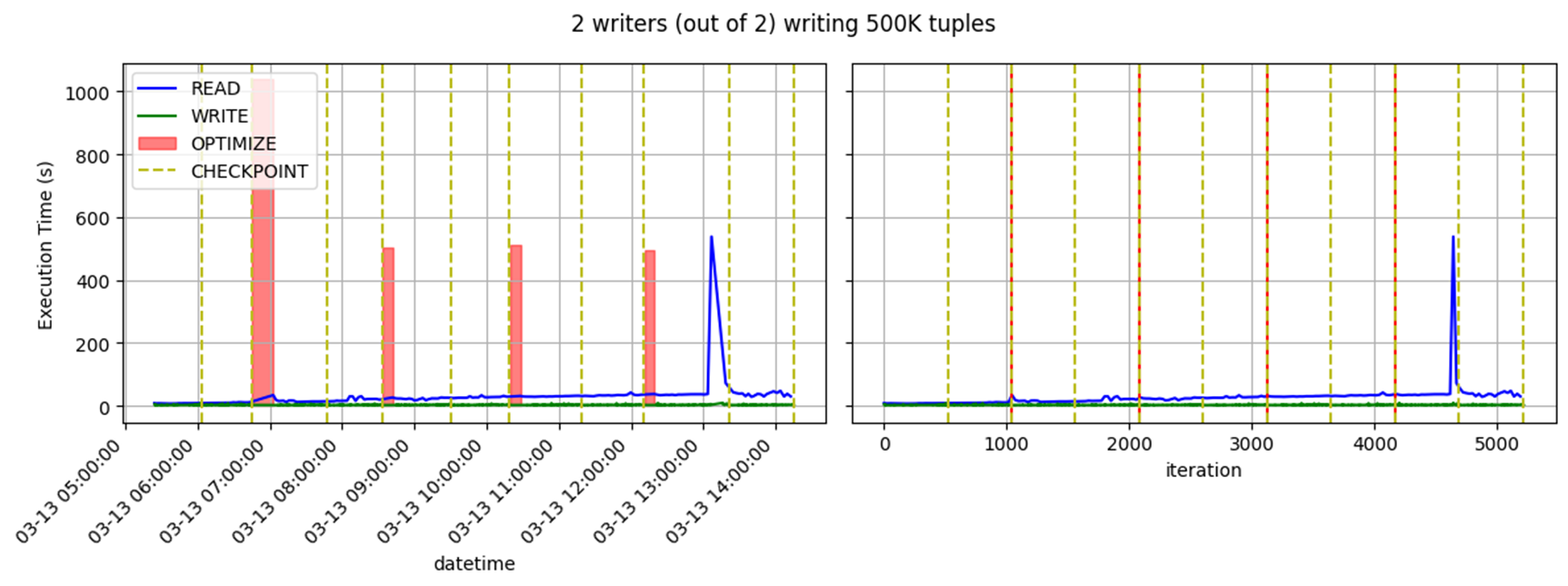
Scalability
Delta Lake
Lakehouse
A medallion architecture is a data design pattern used to logically organize data in a lakehouse, with the goal of incrementally and progressively improving the structure and quality of data as it flows through each layer of the architecture

Medallion architecture
Lakehouse
Example of usage